Adjust
- Compare the offset and angular error to the tolerance demands.
- If the angular error need to be adjusted, please shim the machine first, then adjust the offset.
- Tighten the bolts and remeasure.
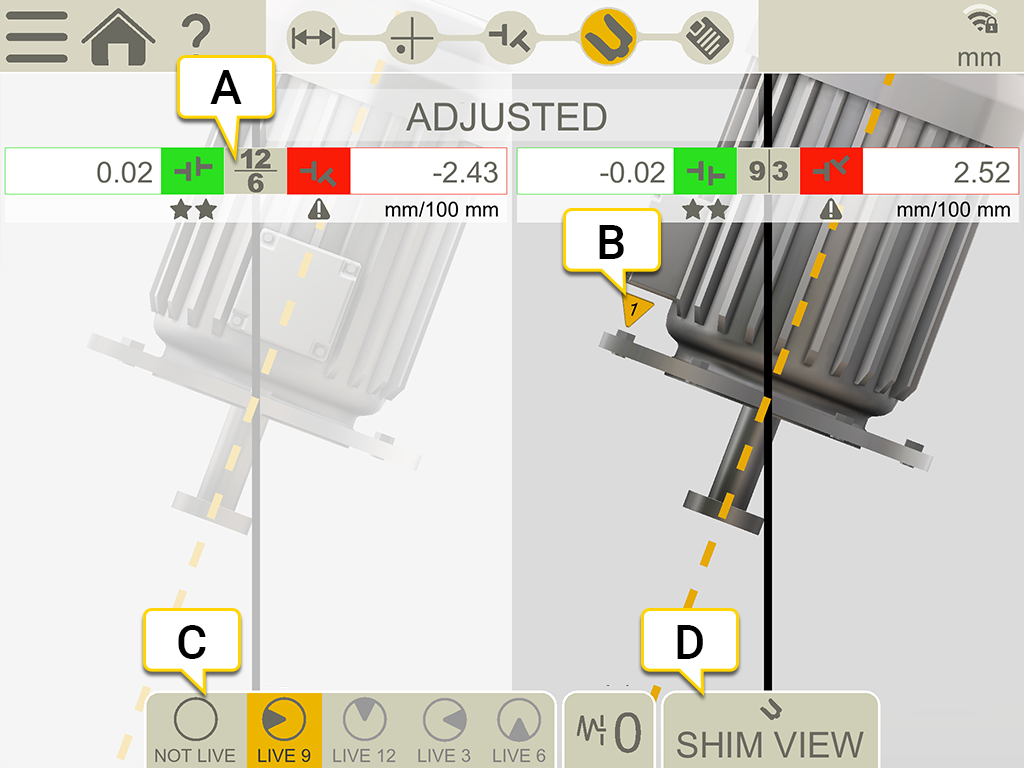
- Values are displayed live in the direction 12-6 or 9-3.
- The first bolt is placed at 9 o'clock.
- Live positions.
- Open the Shim view. Go to Shim values.
Live positions
- Turn the shafts with detectors to a live position.
-
Tap the corresponding live option, see below.
- Tap
 before you leave the live position.
Live options:
|
|
Not live. If you want to change live position, you need to select this first and then the new position. |

|
Live at 9 o'clock. |

|
Live at 12 o'clock. |

|
Live at 3 o'clock. |

|
Live at 6 o'clock. |